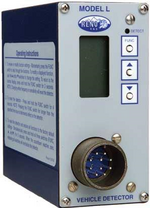
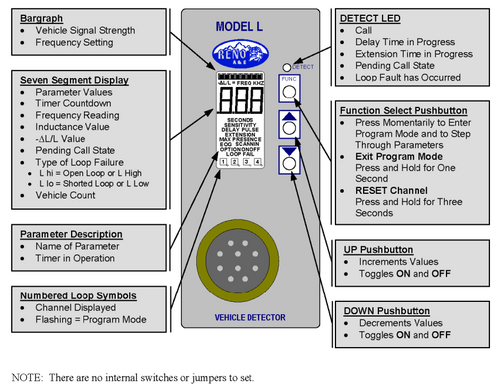
The Reno L-1300-R-xx-D is a direct replacement for the current US Traffic 913A Series Loop Presence Detector for 12/24VDC battery powered AEI sites. The new product is a direct replacement requiring a minor setup change. The 801-8 wiring harness is a direct replacement for the 801A harness previously supplied.
Scope
Provides basic programming instructions with AEI site specific parameters.
Programming
Setup of Reno A&E L-1300 series presence detector
Press the FUNC button to enter programming mode. Pressing FUNC will step through functions.
Press the up/down buttons as necessary to change.
When finished, press and hold the FUNC button for 1 second.
Press and hold the FUNC button to reset the detector.
Set up as shown in the following table. Parameters or functions not listed should be left at defaults.
Function
Setting
Description
Frequency
Pick one
5 KHz separation required on adjacent tracks. Lowest midrange and highest settings can provide at least 3 distinct operating frequencies with sufficient separation.
Sensitivity
1
Adjust if necessary
Presence/Pulse
Presence
Call Delay
2 seconds
Delay before locking on
Call Extend
2 seconds
Holds active after clearing loop
Optional settings
Option 1
Off
Displays loop inductance
Option 2
Off
Displays % inductance change
Option 11
Off
Audible Detect (resets to off after 15 min)
Option 13
13.2
True Presence active, tune-out value .25%
When train enters loop, the detect LED will flash for 2 seconds (delay), then lock on. When train clears, LED will flash for 2 seconds (extend), then go out. If display options are at default, the LCD display will have counters for delay and extend and “Call” when locked on. Otherwise, the selected display from Option 1 or 2 is shown. A bar graph also indicates relative change of inductance. If less than 5 bars are indicated, increase the sensitivity level. Refer to the Reno Operating instructions for more detailed information. Option 11 can be set on to have an audible tone when presence is detected for testing and troubleshooting. It automatically resets to off after 15 minutes.