
RailNET Updating the Train Processor
Revision as of 18:57, 12 November 2025 by DGast (talk | contribs) (DGast moved page Updating APU Processor to RailNET Updating the Train Processor)
For example purposes, Proc0338.exe will be used.
Procedure
- Login to the supervisory menu of the APU.
- Enter <zrec Proc0338.exe> to receive the new processor.
- Enter <dir Proc0338.exe> to confirm the upload was successful.
- Enter <shell proc0338.exe -o> to begin installation of the processor. If successful, it will return a list of files inflating and extracting.
- Once installation is completed, enter the <r> command to perform a full reboot.
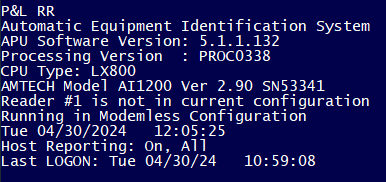
- Login the APU once more and check the log-on message for the Processing Version. The processing version should now match the version installed in the previous steps. In this case, PROC0338.

If this procedure does not succeed, please contact Comet Support for further instruction.